
Business Cards
Offer clear pricing for common runs such as 100, 250, 500 and 1,000 cards.
Quantity Mode lets you create clear price breaks for predefined quantities, making it ideal for products such as business cards, flyers, leaflets and letterheads.
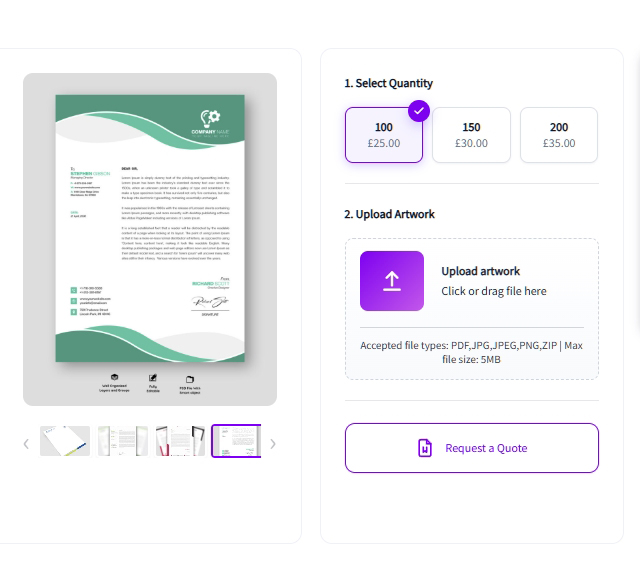
Use Quantity Mode where customers choose from predefined amounts instead of entering custom dimensions.
Offer clear pricing for common runs such as 100, 250, 500 and 1,000 cards.
Build straightforward price breaks for standard print quantities and finishing options.
Sell stationery in fixed runs without creating a separate WooCommerce variation for every quantity.
Use the same simple quantity-driven approach across a wider range of standard-format print products.
Set the quantities and pricing in the admin area, then give customers a clean quantity selector on the product page.
Define the fixed quantities customers can choose from for the product.
Assign the correct price to each quantity so Varinkio can display the right total instantly.
Let customers upload their print-ready file as part of the product configuration.
The configured product continues through your normal WooCommerce cart and checkout workflow.
Instead of creating a separate WooCommerce variation for every quantity, Varinkio lets you define the available quantity breaks and their pricing in one structured setup.
Quantity Mode is included in Varinkio Lite, so you can start building fixed-quantity print products before upgrading to Varinkio Pro.
Yes. You can define the fixed quantities available for each product and set the pricing that applies to each quantity.
Yes. Quantity Mode is included in Varinkio Lite and can be used for fixed-quantity print products.
Yes. Artwork upload can be included in the product workflow so customer files remain connected to the WooCommerce order.
Quantity Mode works well for products commonly sold in fixed print runs, such as business cards, flyers, leaflets, letterheads and other stationery.